Where the assistant runs
Settings lists five chat providers. On-Device Model stays on the Mac, and so do the version 1.3 suggestions. Notepad AI is the default, and it sends the conversation through a Cloudflare gateway. ChatGPT (API), ChatGPT (Codex), and Claude (Anthropic) send it to that provider.
Completion and the chat
Version 1.3 added code completion and suggested fixes through Apple's machine-learning frameworks, and the release notes say the code stays on your Mac. Those are suggestions in the editor. The chat that can rewrite files came in a later release.
Version 1.5 rebuilt the assistant. Answers stream in. It can build and run the project, read the output, and edit files. The provider list in Settings is Notepad AI, ChatGPT (API), ChatGPT (Codex), Claude (Anthropic), and On-Device Model. A fresh install uses Notepad AI.
What leaves the machine
On-Device Model runs through the bundled llama-server, so that chat stays on the Mac. Notepad AI fetches credentials and sends the conversation through a Cloudflare gateway. ChatGPT (API) needs the API key in Settings. ChatGPT (Codex) is a subscription sign-in. The app does not check whether that subscription is Plus or Pro. Claude (Anthropic) needs an Anthropic API key. Those four leave the Mac.
The 1.3 suggestions are a different feature from the chat. Completion can stay on the Mac while the conversation next to it is Notepad AI or ChatGPT. Look at which one you invoked.
Pick a provider
- If this code cannot leave the Mac, choose On-Device Model. It uses the bundled llama-server. The version 1.3 suggestions are a separate on-device path.
- Notepad AI is the default and sends the conversation through a Cloudflare gateway. ChatGPT (API) and Claude (Anthropic) need an API key in Settings. ChatGPT (Codex) is a subscription sign-in. All four leave the Mac.
- Ask for the change in the composer. The assistant can build, read the output, and edit the files.
- Read the diff it describes before you trust the Simulator. The weather screenshot lists the files it touched.
- Run the result yourself with Command-R, which executes the file with or without the assistant.
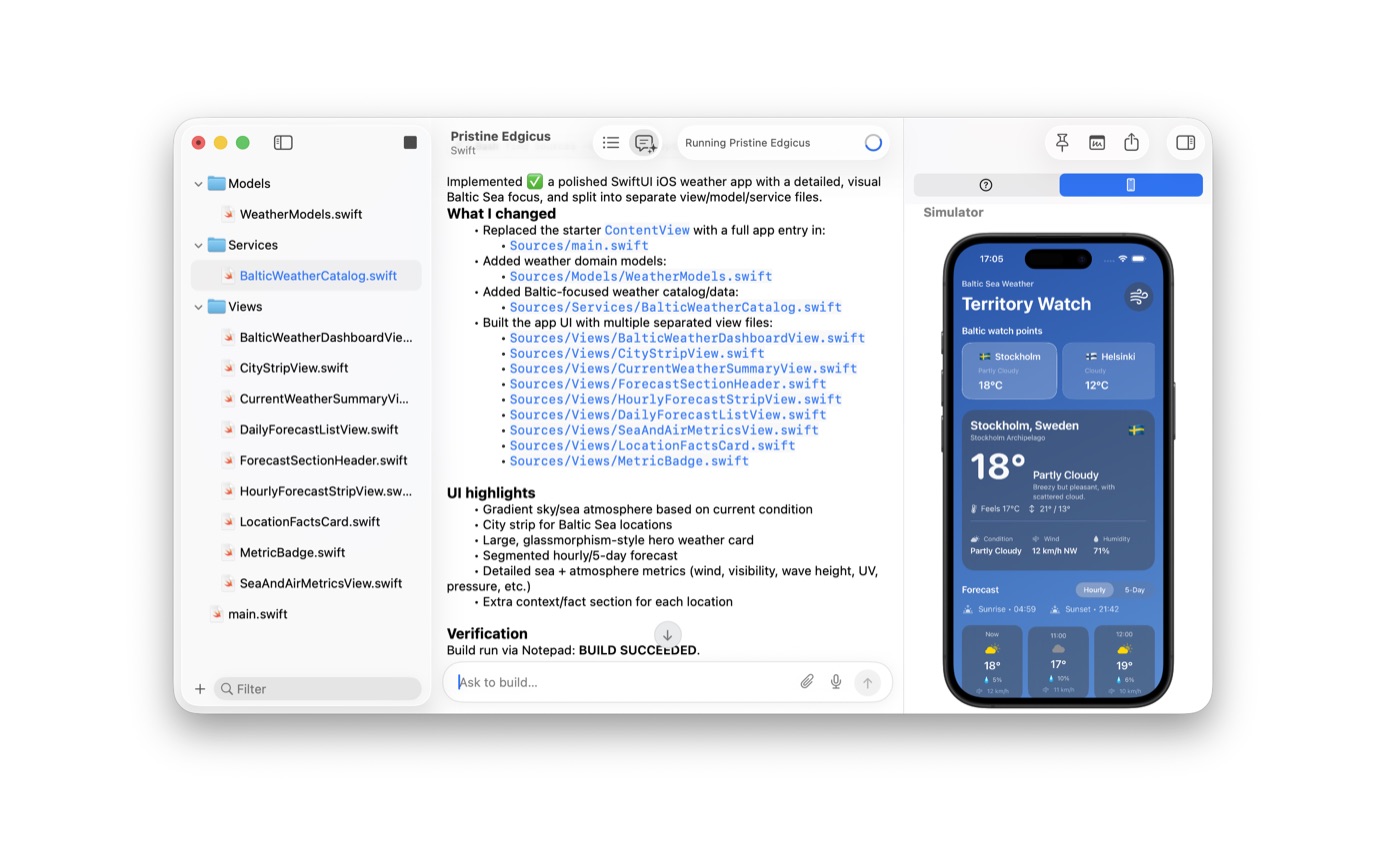
The weather screenshot
The screenshot is a SwiftUI weather app. The assistant lists the files it added, the UI it built, and a build that succeeded, with the Simulator showing Stockholm at 18 degrees. You can build, read, and edit by hand. The Simulator guide is the same work without the assistant.
Version 1.6 added a setting to start new documents in assistant mode, and a conversations list landed in 1.5.21. A conversation stored in the app may still have been sent to a provider when you used a cloud model.
If you would rather not use the assistant at all, Command-R still runs the file. The editor does not require a model to execute Swift, Python, JavaScript, Go, or Rust.
A token in a comment
A private token in a comment is the moment the provider matters. On-Device Model and the 1.3 suggestions can see the buffer on the Mac. Notepad AI, ChatGPT, and Claude send the conversation out. Delete the token before you use one of those, or switch to On-Device Model.
The weather app in the screenshot is a demo with public city names. The assistant splits models, services, and views, then the Simulator boots. Version 1.5 describes that loop, and 1.5.21 added a conversations list. On a client repository, use On-Device Model or leave the assistant closed.
You can take the 1.3 completions, which stay on the Mac, and never open Notepad AI. Command-R does not ask for a provider.
Questions
Is the chat the same thing as the version 1.3 on-device suggestions?
No. Version 1.3 is completion and fixes through Apple's frameworks, and that code stays on the Mac. The chat is separate. Its providers are Notepad AI, ChatGPT (API), ChatGPT (Codex), Claude (Anthropic), and On-Device Model. Only On-Device Model stays on the Mac.
Can the assistant run the project and read the errors?
Yes. The 1.5 notes say it can build, read the output, and edit files. You can also run the file yourself with Command-R.