Prototype SwiftUI without an Xcode project
You can see a SwiftUI screen on a phone without creating an Xcode project. In Notepad.exe, start from a SwiftUI App or UIKit App template, write the view, and run it. The iOS Simulator opens beside the source.
SwiftUI and UIKit
The idea is usually small: a tap counter, a settings row, or a card with a temperature and a city name. Xcode will happily wrap that in a project, a storyboard-free target, a bundle identifier, and a signing setting you do not care about yet. You wanted to know whether the type feels right at body size.
Version 1.1 of Notepad.exe added Simulator runs for SwiftUI and UIKit with no project setup. Later releases made the boot less fragile: the app waits for the device, prefers hardware that is already up, and tells you when a launch fails. Version 1.5 put Quick Help and the Simulator in one inspector, so the documentation and the phone are the same panel.
The Simulator
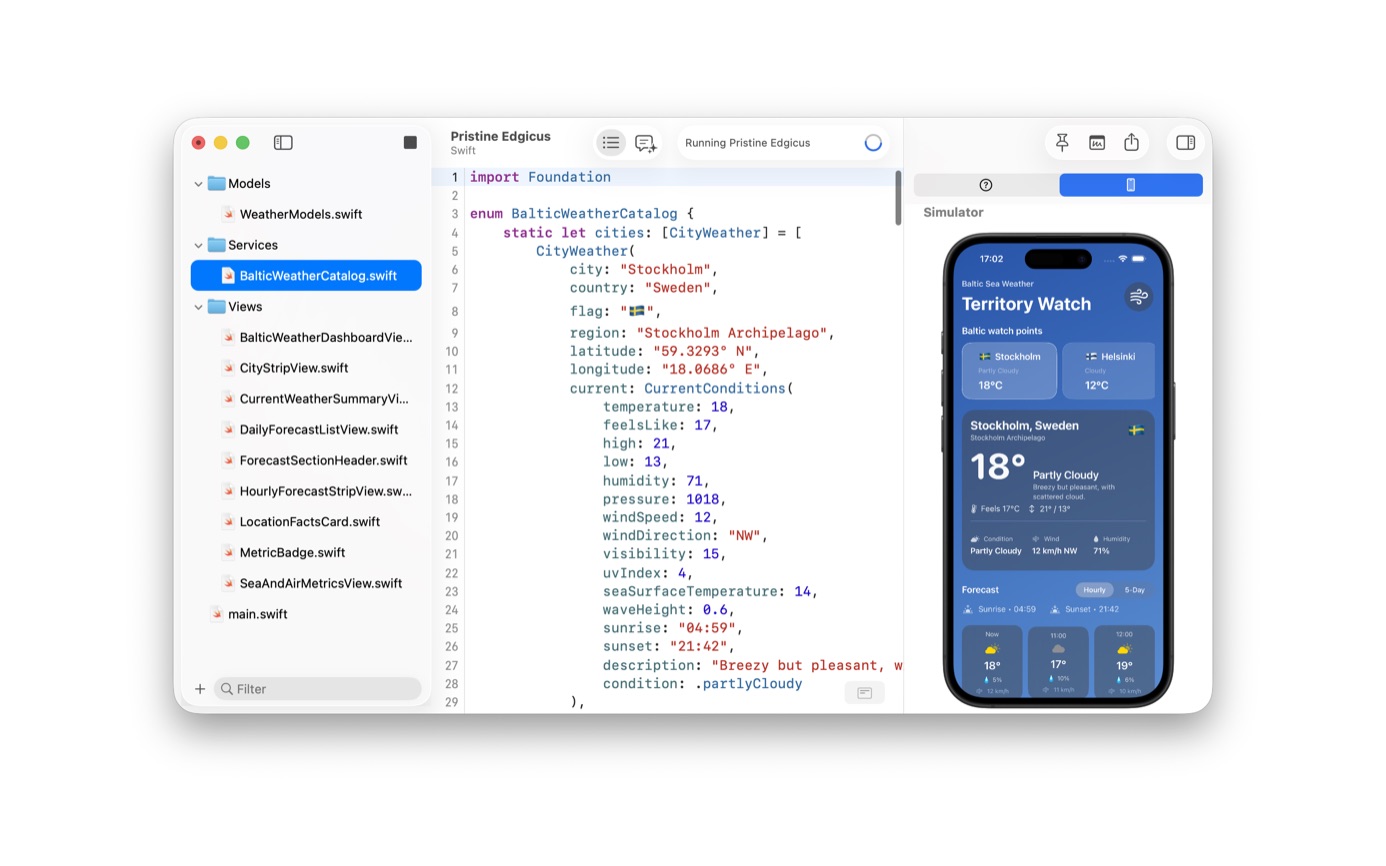
One press screenshot is a small SwiftUI demo, a title and a button that increments a tap count, running on a phone next to the source. Another is a larger weather UI, Stockholm and Helsinki, built out across Models, Services, and Views, still running in that same side panel. You can start with the demo and end with the weather app in the same editor.
UIKit is on the same sheet as SwiftUI. Pick UIKit App for iOS when the experiment is a view controller rather than a View. The Swift file guide covers the case where you do not need a screen at all.
From a template to a phone
- Install the latest Xcode so the Simulator runtime is on the Mac.
- In Notepad.exe, make a new note and choose SwiftUI App or UIKit App for iOS.
- Write the view. A title, a button, and a piece of state are enough to know if the idea holds.
- Press Run. The app waits for a Simulator to boot and prefers a device that is already running.
- Read failures in the editor. If the launch fails, the app says so instead of spinning.
Limits
A Simulator run produces no archive and no App Store Connect upload. Memory graphs and app extensions still need Xcode. The terms still require Xcode on the machine. Notepad.exe uses that toolchain.
When the interface is a Mac window, you can run the SwiftUI note as a Mac app and, once it is useful, use Distribute App. That writes a local app. AppKit and a macOS Swift package use the same command. Shipping it is a different project, and that project belongs in Xcode.
The assistant can sit in the same window while you do this. In the weather screenshot it has already edited the SwiftUI files and the Simulator is showing the result. Whether that conversation stays on your Mac depends on the provider you picked. That split is its own guide.
A tap counter
The small Simulator screenshot on the site is that scope: a view with a title, a button, and an integer. Press the button and the count goes up. You can see whether the type size is wrong.
The weather screenshot is the same path after the idea survived. Models, services, and views are real files in the sidebar. The Simulator shows Stockholm at 18 degrees and a second city beside it. The file count went from one to a dozen in the same editor, and there is still no .xcodeproj. When you need signing, move the work to Xcode.
iPhone Duo and later Simulator updates are in the 1.6 notes. The editor follows the runtime Xcode provides. If a device family is missing, it is missing from the Xcode you installed, not from a template in Notepad.exe. Update Xcode, then run the note again.
Keep the prototype note even after the real app exists in Xcode. The note is the place you try a color, a spring, or a gesture without dirtying the signed target. When the experiment works, copy the view across.
Questions
Does the Simulator stay inside Notepad.exe?
It opens in the inspector beside the source. Since version 1.5, Quick Help and the Simulator share that panel.
Can I prototype UIKit this way too?
Yes. The new-note sheet has a UIKit App template for iOS, and Simulator support for UIKit experiments shipped in version 1.1.