Export a SwiftUI Mac app
A macOS Swift note in Notepad.exe can become a Mac app you open on your own machine. The menu item is Distribute App, and the app it writes stays on your Mac. App Store upload is a separate job in Xcode. Python, Go, JavaScript, and Rust stay runnable in the editor.
A window you open again
Most notes should stay notes. Some of them become a utility you want on the Dock: a converter, a small viewer, a button you press a few times a day. At that point, reopening the editor to press Run is the slow part.
Version 1.3 added this path alongside the on-device suggestions. Distribute App is enabled for a macOS Swift note: SwiftUI, AppKit, or a macOS Swift package. An iOS Simulator build is excluded. Python, Go, JavaScript, and Rust run in the editor and are left unpackaged. File > Export is a different command. It writes a source file, a PNG, or a .notepad package. Version 1.5.1 added app icon support for distributed bundles. If you do not pick an icon, the app uses its default.
Distribute App
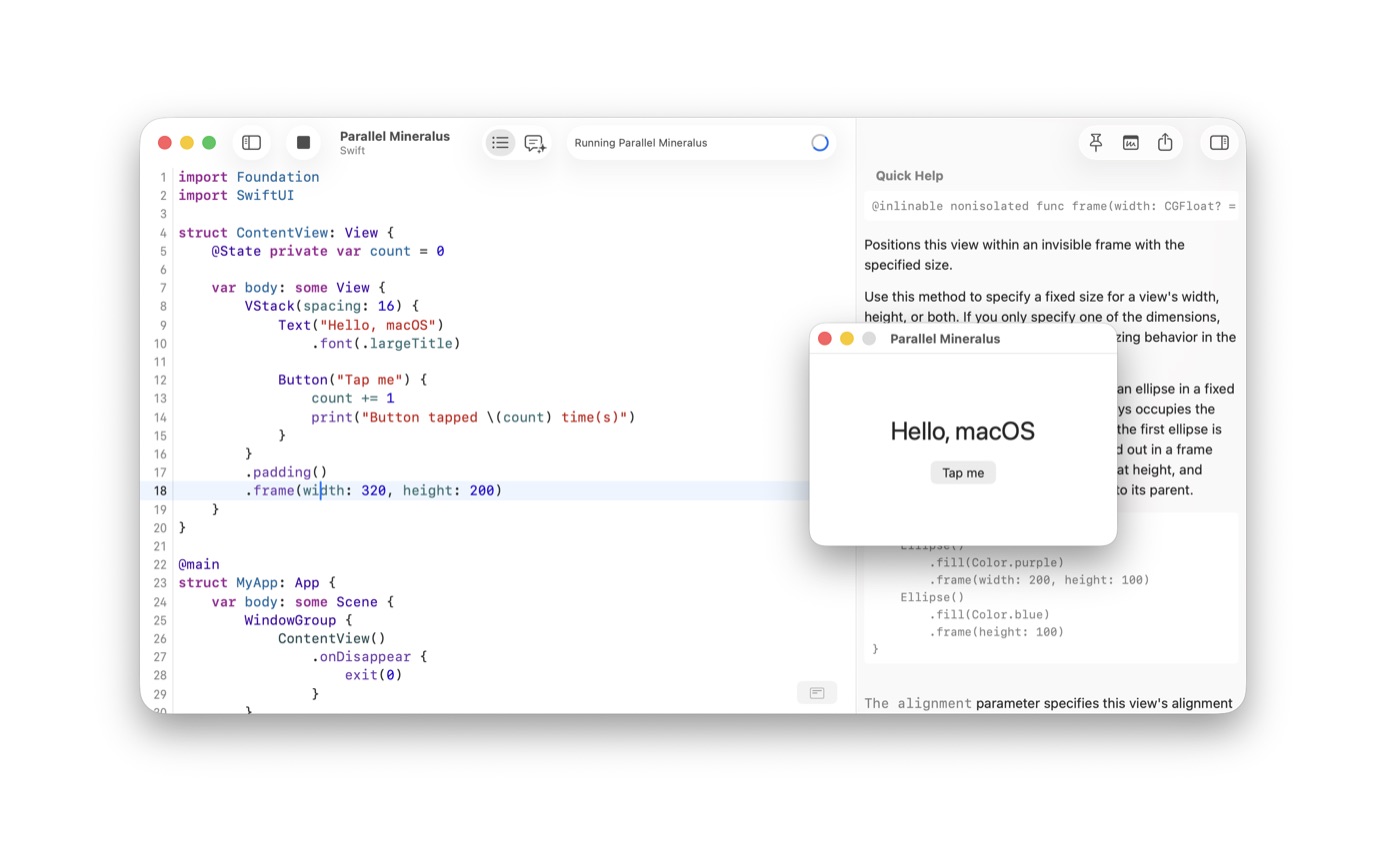
Distribute App writes the program you have been running so you can open it without the editor. The screenshot shows a SwiftUI window in front of the source: a ContentView, a title, a button, a fixed frame. AppKit and a macOS Swift package use the same menu. The save panel is titled Distribute Application.
This flow does not notarize the app, upload it to TestFlight, or sign it for Developer ID. The press kit says more distribution options are planned. They are not in the app today. If the tool needs to be handed to customers, the next move is Xcode, signing, and the ordinary Apple path.
The steps
- Start a macOS Swift note, or open one you have already been running. SwiftUI, AppKit, and a macOS Swift package all qualify.
- Run it until the window is the one you want to keep. The screenshot is a small window with a title and a button.
- Choose Distribute App. The command builds the note, then writes a local Mac app. Outside the Setapp build it checks the license first.
- Open the exported app from Finder. The distribute command does not codesign or notarize it.
- When you need notarization, TestFlight, or a second target, move the real product into Xcode.
Python, Go, JavaScript, and Rust
Python, Go, JavaScript through Bun, and Rust keep running from the editor, including a Linux target where that target exists. Distribute App does not wrap them as a double-clickable Mac app.
A Mac Swift note can use Xcode, Command Line Tools that include Swift, or the macOS toolchain the app assembles. The bundled terms still say the latest Xcode is required. If the window is not worth keeping, stay in the note. The Swift guide is the earlier step: run the file, then distribute only if you want the app.
After the app is on disk
Open the app from Finder the way you open any other app you built locally. It should show the same window you ran inside Notepad.exe. If you picked an icon, version 1.5.1 is the release that started carrying icons on distributed bundles. Otherwise the bundle uses the default icon.
Gatekeeper will treat it like an app you built yourself. The distribute command does not codesign or notarize the bundle. For a tool only you launch, that is acceptable. For a tool you email to someone else, stop and use Xcode's archive flow.
A window you already ran ten times is the usual case: a unit converter, a log tail with three buttons, a SwiftUI or AppKit control you are showing a coworker. An app with iCloud, a login, or a second process needs a project in Xcode from the start.
If the app is for you alone, put it in /Applications or leave it in the folder Notepad.exe wrote. The note remains the editable source. Change the note, choose Distribute App again, replace the app.
Questions
Can I ship the exported app on the App Store?
No. The export is a local Mac app. Archives, notarization, and App Store upload are Xcode work. The press kit says more distribution options are planned.
Will export package my Python or Go program?
No. Distribute App is for a macOS Swift note, including SwiftUI, AppKit, and a macOS Swift package. Python, Go, JavaScript, and Rust stay runnable in the editor.