Organize code snippets on a Mac
Keep code snippets in a Library you can search, instead of a Desktop folder of files named final2. Notepad.exe stores each note with a language and optional tags, and you can pin the window above your other apps.
The Desktop folder
A snippet has a short life if the only record of it is the directory you were in. People re-solve the same DateFormatter, the same argument parser, the same SwiftUI button, because the file was called scratch.swift and the folder was called tmp. Search in Finder finds the filename. It does not find the language, the platform, or the tag you meant.
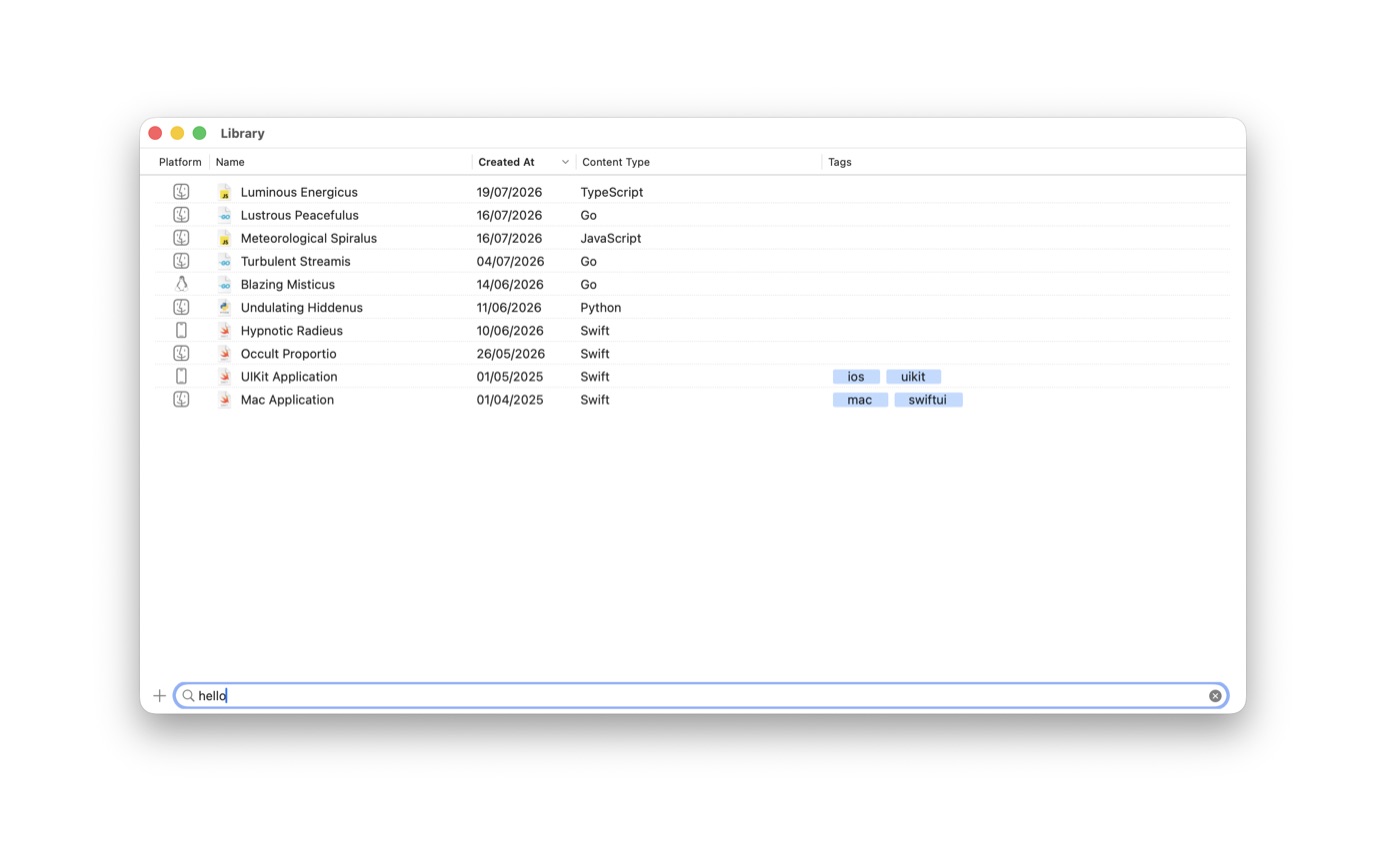
Notepad.exe started as a place for those files. The 1.0 notes describe a searchable, taggable Library and floating notes that stay above other apps. The Library screenshot is the current window: platform, name, created date, content type, tags, and a search field. One row is a UIKit application tagged ios and uikit. Another is a Mac application tagged mac and swiftui. A Python note and several Go notes sit in the same list.
Tags and a pinned window
Language is the coarse filter. Tags are the one you add when you care about the job: a UIKit layout, a Linux probe, a parser you trust. Search matches the name, which is a reason to name the note after the problem rather than the mood you were in.
Pin the window when the snippet is a reference you are typing from. Jakob's note on the homepage is about that, and about the Library, as the reason the app beat both a smaller editor and Xcode for small work. You can also export a code image when you want to show the snippet to someone else. Thomas Ricouard's note on the homepage is about that image, not about the Library.
Save it
- Run the snippet once. If the output is what you wanted, the note is worth keeping in the Library.
- Leave it in the Library. Give it a name you would search for later.
- Filter by language. Content type in the Library is Swift, Python, Go, JavaScript, TypeScript, and the rest.
- Add a tag when language is not enough. The screenshot shows ios, uikit, mac, and swiftui.
- Pin the window when you want the snippet above Xcode, a browser, or another editor.
After the snippet
A Swift note can become a package, a Simulator prototype, or a local Mac app. A Python note can grow requirements. A Go note can gain a module and a Linux run. It is still the same note.
Version 1.5 turned the sidebar into this Library and added swipe actions. Version 1.6.1 added go-to-definition and back-forward navigation for package files, which matters once the snippet is no longer one file. Until then, search, tags, and a pinned window are the whole system.
Names
Name the note after the problem. round-currency is searchable. tuesday is not. The Library search field in the screenshot is the whole retrieval system, next to filters for content type. If you have thirty Swift notes, the tag is what separates a SwiftUI layout from a parser. The tags already in use on the site's screenshot, ios, uikit, mac, swiftui, are enough of a pattern to copy.
Pin is for the ten minutes when you are transcribing, not for a window you leave up all day. A pinned note over Xcode lets you copy a call you got right last March. When you are done, close it. The Library still has it. Floating notes were in the 1.0 release so a snippet can sit above the app you are typing into.
A code image is the other exit. You export a picture of the selection for a chat or a slide. The Library still holds the note, which is the copy you want next time, including on a Thursday.
Review the list once a month and delete the notes you would not run again. A Library of three hundred untitled experiments is the Desktop folder problem with better fonts. Tags only help if the list is short enough to scan.
Questions
Can I pin a snippet above Xcode?
Yes. Notes can float above other apps. That is the behavior Jakob mentions on the homepage, next to the Library.
Can I share a snippet as an image?
Yes. The editor can export a picture of the code. The homepage quote from Thomas Ricouard is about that.