Run Go on a Mac without creating a module
Go on a Mac can start as one file. Open a note in Notepad.exe and press Command-R. You do not type go mod init. For a new note, the app creates go.mod before the build. An opened Go module must already have one.
go.mod is written for you
The program is often fifteen lines, and you still make a directory and decide the module path before fmt.Println has run. For a generated note, the app runs go mod init with a module name taken from the note's name, unless go.mod is already there. Command-R is the same shortcut as Swift, Python, and JavaScript.
Highlighting, completion, and diagnostics come with that. The file shows up in the Library under Go. A third-party import uses the module the app created. If you open an existing folder and it has no go.mod, the build stops with "Native Go module is missing go.mod".
The Linux screenshot
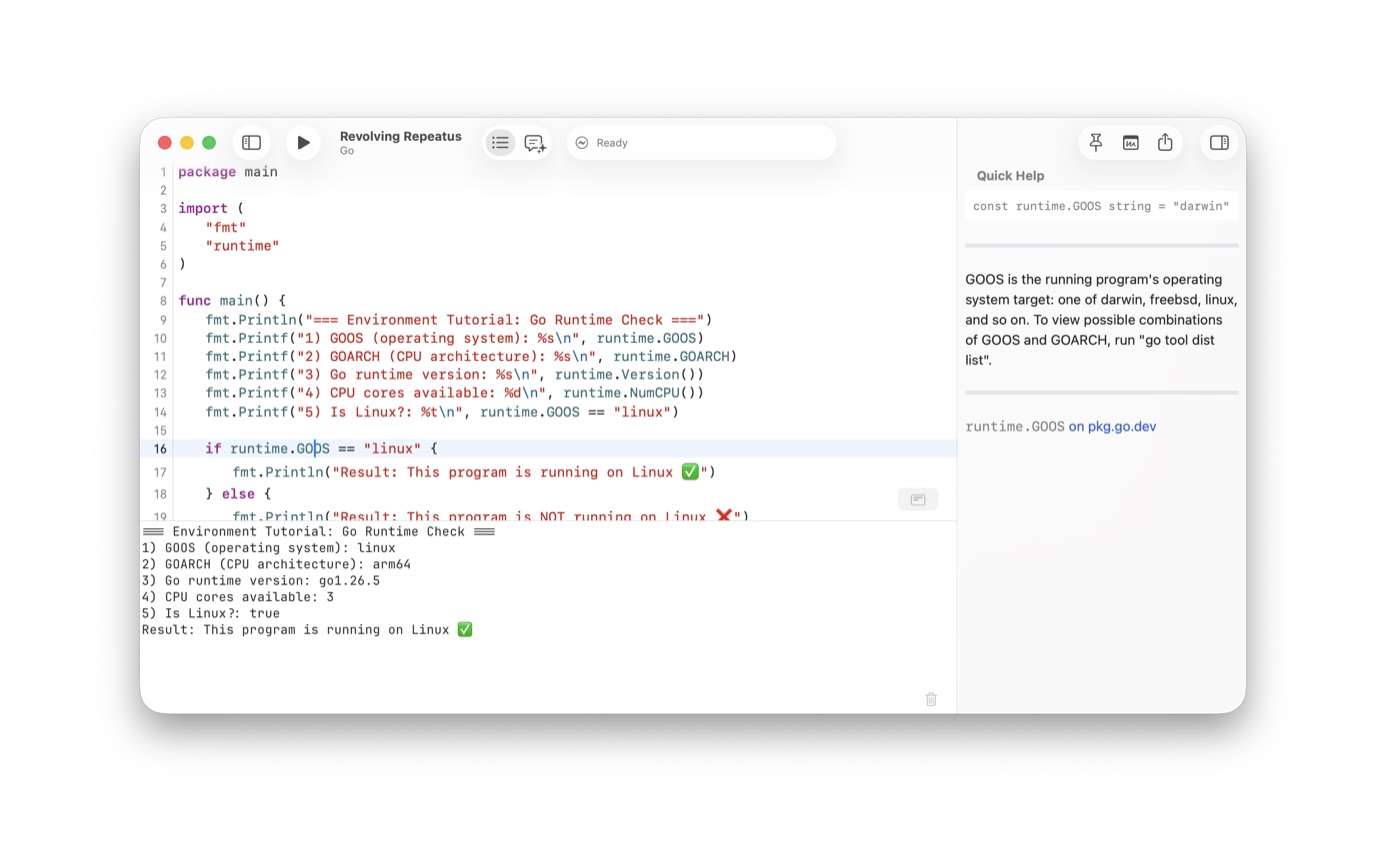
The screenshot is a package main that prints runtime.GOOS, runtime.GOARCH, the Go version, and whether GOOS is linux. The output says linux, arm64, go1.26.5, and that the program is running on Linux. That run happened from the Mac.
Use it when the bug you care about is environmental. A path, a build tag, a number of CPUs. The Linux build sets CGO_ENABLED=0, so that run does not exercise cgo. The Linux guide lists the other languages. The template sheet already splits Go Program into macOS and Linux.
Run it
- Open Notepad.exe and start a Go note. The new-note sheet has a Go Program for macOS and one for Linux.
- Write a main package. A few fmt lines are enough.
- Press Command-R. Highlighting, completion, and diagnostics are on for the file.
- The app writes go.mod for a new note before the build. A third-party import uses that module. An opened folder must already contain go.mod.
- Switch the run to Linux when the program should report linux. The screenshot is that run. A darwin line means the Mac target is still selected.
When the file needs a dependency
A new note can stay one file. The app still writes go.mod before the build, including when every import is in the standard library. You add dependencies in the note when you need a router, a driver, or a version pin. Opening someone else's module is different: that folder already has to contain go.mod.
The same Library that holds the Go note holds the Swift and Python ones. Tag it if you will need it again. Pin it if you are copying from it into another editor. Details are in the snippet guide.
A first file
Start with package main, an import of fmt, and a main function that prints something you can check by eye. The screenshot's program prints GOOS, GOARCH, the runtime version, the CPU count, and a boolean for Linux. If it prints darwin, you are on the Mac template. If it prints linux, you are on the Linux one.
fmt, os, time, and net/http can stay in that one file. The go.mod is still created. A github.com/... import needs an entry in the note's dependencies so the module can fetch it. The 1.5 notes list Go dependencies next to the templates.
The Linux screenshot printed go1.26.5. That is the Go on the machine that took the picture. If the Mac has no Go, the app downloads 1.26.4 from go.dev. If Go is already installed, that version is the one that runs.
Questions
Does a single Go file need a go.mod?
The app creates one for a new note, including a standard-library experiment. You do not type go mod init. If you open an existing module, that folder has to contain go.mod already.
Can that same file run on Linux?
Yes. The Mac cross-compiles a static binary with cgo turned off, and a Linux container runs that binary. The screenshot shows runtime.GOOS reporting linux. There is a Go Program template marked Linux.