Test code on Linux from a Mac
You can test code on Linux without leaving the Mac. Notepad.exe starts its own Linux container for the run. Write the file, choose the Linux target, and read output that reports linux. Swift and Go are cross-compiled on the Mac, then the binary runs in the container. Python, Bun, and Rust run inside the image.
darwin and linux
A path separator, a default filesystem case, a Go GOOS value, a Python wheel, a Swift overlay: any of these can be fine on your Mac and wrong on the machine that will actually run the program. The slow way to find out is a VM, or a commit, or a deploy.
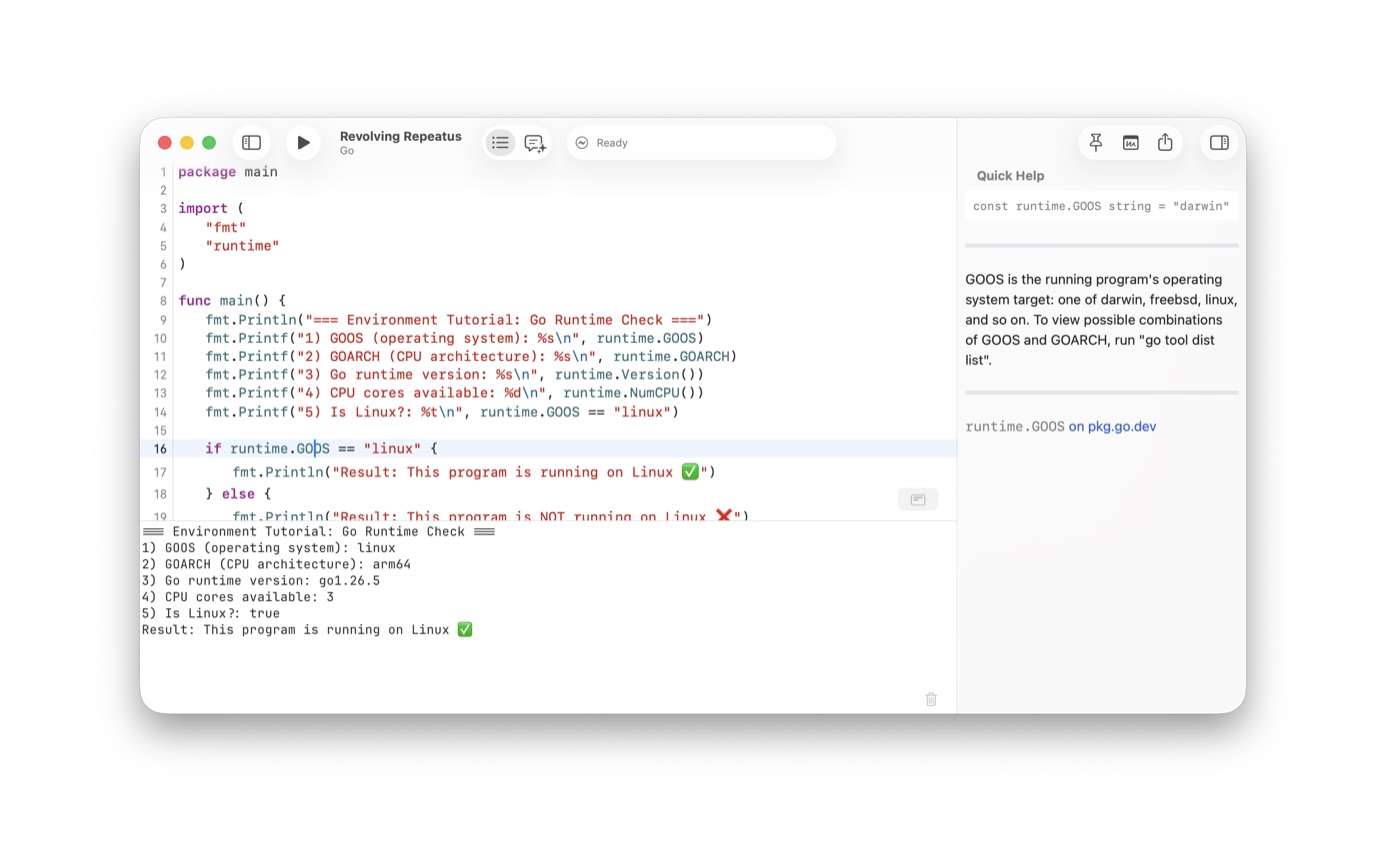
The app starts the container for the run. There is no virtual machine to install and no SSH session to open. Version 1.4 notes talked about a Linux environment and VM management. The image the app runs now is linux/arm64, with Python 3.13, Bun 1.4.2, and Rust 1.95.0. Swift toolchains and Linux SDKs still download on demand, and the Activity viewer in the toolbar shows builds and downloads. The press screenshot is a Go program printing runtime.GOOS as linux and GOARCH as arm64.
Languages
Swift: the Mac cross-compiles with a Linux SDK the app can download. The binary then runs in the container.
Python: a generated note runs the container's python3. Dependencies listed on the note are pip-installed into a site-packages directory the container can see. A native Python package is refused, because those packages run project scripts the container does not support yet. The Mac path, including the .venv the app creates, is the Python guide.
Go: the Mac cross-compiles a static binary with cgo turned off. The guest has no Go toolchain, so the container only runs that binary. The screenshot on this page is that Go file. See the Go guide.
JavaScript and TypeScript: a generated note runs the container's Bun. A native JavaScript package script is not supported in the container yet. See run JavaScript with Bun.
Rust: cargo runs in the container, and only on Apple Silicon. The compiler you select has to match the image, Rust 1.95.0. An Intel Mac is told that Rust Linux containers require Apple Silicon.
A Linux run from the Mac
- Write the program on the Mac in Notepad.exe. A Go, Swift, Python, JavaScript, or Rust note is enough to start.
- Pick a Linux template when you are starting fresh. The sheet includes Linux templates for Swift, Go, Python, JavaScript, TypeScript, and Rust.
- Run the Linux target. The app starts the container. For Swift, it downloads the toolchain and Linux SDK it needs.
- Read the output. In the Go screenshot, runtime.GOOS prints linux and GOARCH prints arm64.
- Keep editing on the Mac. This check uses the app's container, with no virtual machine to install and no SSH session to open.
Limits
The container is the app's linux/arm64 image, not a full distribution you administer in a window. If the program depends on a specific libc, a systemd unit, or a package the SDK does not include, test it on the distribution you deploy to. Use this run to catch bugs that showed up only because the code had only ever executed on darwin.
The Library has a platform column, so a note you ran for Linux is labeled that way when you look for it later. Pin it if you are comparing the Linux output with the Mac run. Both can stay open.
Print the operating system
Do not trust a successful exit code by itself. Print the operating system. In Go that is runtime.GOOS. In Python, platform.system() or sys.platform. In Swift, a compile-time check or ProcessInfo depending on what you are asking. The Go screenshot prints those values and then a sentence that says it is running on Linux, with a checkmark the editor rendered in the output. If that line says darwin, you ran the Mac target.
Swift's Linux path downloads a toolchain and an SDK. The first run is slower because of that download. The Activity viewer in the toolbar shows it. Later runs use the cache.
Questions
Do I need a virtual machine to run the Linux target?
No. The app starts a Linux container for the run. You do not install a virtual machine. Swift and Go are cross-compiled on the Mac. Python, Bun, and Rust execute inside the container.
Does Rust run on Linux here?
Yes, on Apple Silicon. Cargo runs inside the container, and the compiler you select has to match the image, Rust 1.95.0. An Intel Mac cannot run that container.